The information system of the lab contains a list of "publications" for all the members.
A publication is associated to a single type among the following list.
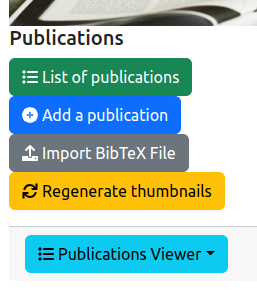
The management of the list of publications is accessible from the general administration page:
As it is illustrated on the figure above, three features are provided for administration and four features related to the public front-end:
List of publications: display the list of all the publications (see Section 3).Add a publication: add manually a publication in the information system (see Section 4).Import BibTeX File: add many publications in the information system from a BibTeX file (see Section 5).Regenerate thumbnails: generate the thumbnail pictures associated to the publications (see Section 6).Front-end feature is:
Publication viewer: shows the list of publications from the front-end point-of-view.The entire list of the pubications is displayed in a table:

The columns of the table are the following:
ID: the identifier of the publication inside the lab's information system.Title: the title of the publication.Type: the type of the publication (see Section 2).Year: the year of publishing.Where published: the journal, conference or place where the publication was comitted.Files: the list of associated files (PDF of the publication, scanning of any award associated to the publication).Validated: an icon in this column indicates if the information of the publication was validated by a local authority.Actions: list of tools to be applied on a publication:
The backend software provides a form for editing or adding a publication description in the information system. This form contains the mandatory informations (marked with a red star) and the optional informations to be associated to a publication. The following figure shows you a part of the form.
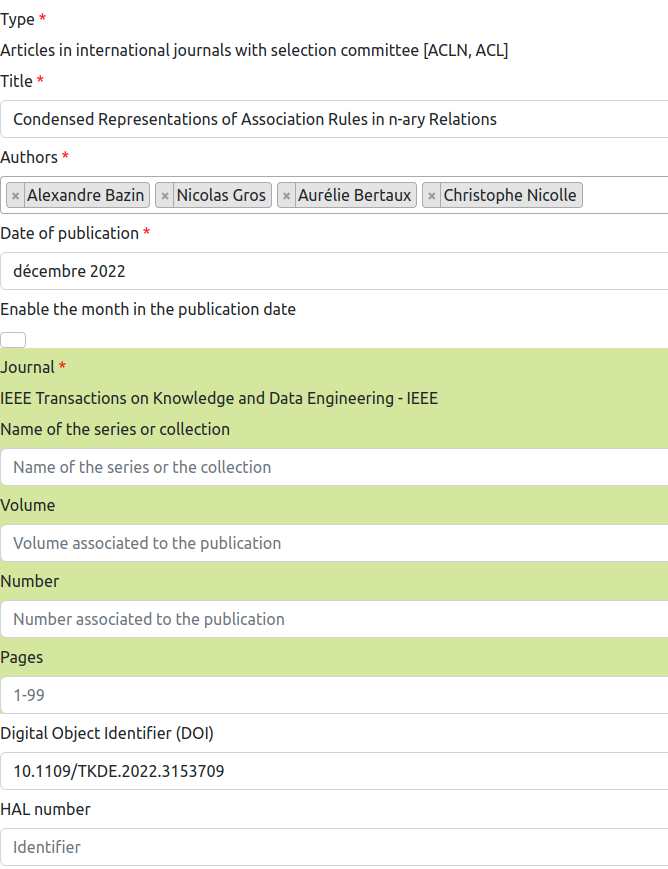
The fields that are common to all the types of publications are:
Type: the type of the publication (see Section 2). When you change this field value, the input fields are automatically adapted to ask you the right information for the type of publication.Title: the title of the publication.Authors: the list of the authors of the publication. You have to type the name of a person, and press <ENTER> to add the person in the list. The component opens a popup window with the already known persons.Date of publication: indicate the month and year of publication. The month value is considered only if the checkbox Enable the month in the publication date is checked. If you don't know the month, just uncheck this box.Digiral Object Identifier (DOI): DOI is an international standard for identifying a digital document worldwide. You could enter the DOI of your publication, without the URL prefix https://doi.org/.HAL number: HAL is a online database of the publications that is provided by the French Ministery of Research. If your publication was submitted to HAL, you could type its number here.Abstract Text: the abstract of the publication.Keywords: the keywords that are associated to the publication.Website related to the publication: you could enter any URL that is suitable for supporting your publication.Internet address of the DBLP page: the URL of the publication on DBLP, which is a platform for sharing your publications (mostly in Computer Science).Address of a video on Internet: if you would like to associate an online video with your publication, you could enter the URL to the video in this field.Language: the language with which the large majority of the text of the publication is written with.PDF copy of the publication: you could provide the PDF copy of your publication to the information system.Award certificate for the publication: if you have gained an award associated to the publication, you could publish the PDF copy of this award.Force the validation of the publication by organization authority: this flag is used by some tools for validating this publication and avoid to be considered as a duplicate publication in the database.Is the publication validated by a local authority? indicates if a local authority, e.g. the Director of the research lab, has validated the information associated to the publication. The fields that are specific to publications in journals or journal editions are:
Journal: you have to select the journal in which the publication is published. If the journal does not exist in the information system, you have to create it before adding the publication. (see the documentation for journal addition).Volume: indicates the volume's number of the journal in which your publication was published.Number: indicates the issue's number of the journal in which your publication was published.Pages: indicates the range of pages that corresponds to your publication in the journal.The fields that are specific to publications or keynotes in scientific events are:
Scientific event name: enter the name of the scientific event (conference, workshop, etc.).Name of the series or collection: if the publication is issued in a series or collection, you could indicates the name of the series.Volume: indicates the volume's number of the journal in which your publication was published.Number: indicates the issue's number of the journal in which your publication was published.Pages: indicates the range of pages that corresponds to your publication in the journal.Editors: enter the names of the persons who are editing (or organizing) the scientific event.Organization: enter the name of the institution which is organizing the scientific event.Publisher: enter the name of the company that has published the proceedings of the scientific event.Address: enter the location where the scientific event was organized. Usually, it is the city name and the country name.ISBN Number: it is the International Standard Book Number (ISBN) of the pulication.ISSN number: the International Standard Serial Number (ISSN) which is identifying the publication worldwide.The fields that are specific to books are:
Edition: the number that corresponds to the edition of the book.Name of the series or collection: if the publication is issued in a series or collection, you could indicates the name of the series.Volume: indicates the volume's number of the publication.Number: indicates the issue's number of the publication.Pages: indicates the range of pages that corresponds to your publication.Editors: enter the names of the persons who are editing the book.Publisher: enter the name of the company that has published the book.Address: enter the location of the publisher. Usually, it is the city name and the country name.ISBN Number: it is the International Standard Book Number (ISBN) of the book.ISSN number: the International Standard Serial Number (ISSN) which is identifying the book worldwide.The fields that are specific to book chapters are:
Title of the book: the title of the book in which the chapter was published.Chapter number: the number of the chapter in the book.Edition: the number that corresponds to the edition of the book.Name of the series or collection: if the publication is issued in a series or collection, you could indicates the name of the series.Volume: indicates the volume's number of the publication.Number: indicates the issue's number of the publication.Pages: indicates the range of pages that corresponds to your publication.Editors: enter the names of the persons who are editing the book.Publisher: enter the name of the company that has published the book.Address: enter the location of the publisher. Usually, it is the city name and the country name.ISBN Number: it is the International Standard Book Number (ISBN) of the book.ISSN number: the International Standard Serial Number (ISSN) which is identifying the book worldwide.The fields that are specific to theses are:
Institution: the name of the institution in which the thesis was passed.Address: enter the location of the institution. Usually, it is the city name and the country name.ISBN Number: it is the International Standard Book Number (ISBN) of the thesis.ISSN number: the International Standard Serial Number (ISSN) which is identifying the thesis worldwide.The fields that are specific to patents or project documents are:
Type of document: the description of the type of patent, if any.Number: the number of the patent.Institution: the name of the institution which is owning the patent.Address: enter the location of the institution. Usually, it is the city name and the country name.ISBN Number: it is the International Standard Book Number (ISBN) of the thesis.ISSN number: the International Standard Serial Number (ISSN) which is identifying the thesis worldwide.The other types of publication have specific fields. They must be filled according to the semantic of the type.
Because entering publications one by one manually is a long task it is possible to import a group of publications by providing a BibTeX file.
To have information on this feature, go to the dedicated document.
The publications may be associated to a PDF file for the publication and a PDF file for any certificate associated to this publication (see Section 4.1).
To make the system efficient, JPEG pictures are generated from the PDF files to be displayed on the web pages.
For forcing the generation of these PDF pictures, you could use the
feature Regenerate thumbnails and wait for a while.